Guide
Send from your own domain
By default you send from askghost's shared address ([email protected]), so there's nothing to configure. Register a domain only when you'd rather send from your own.
Four steps and you're done
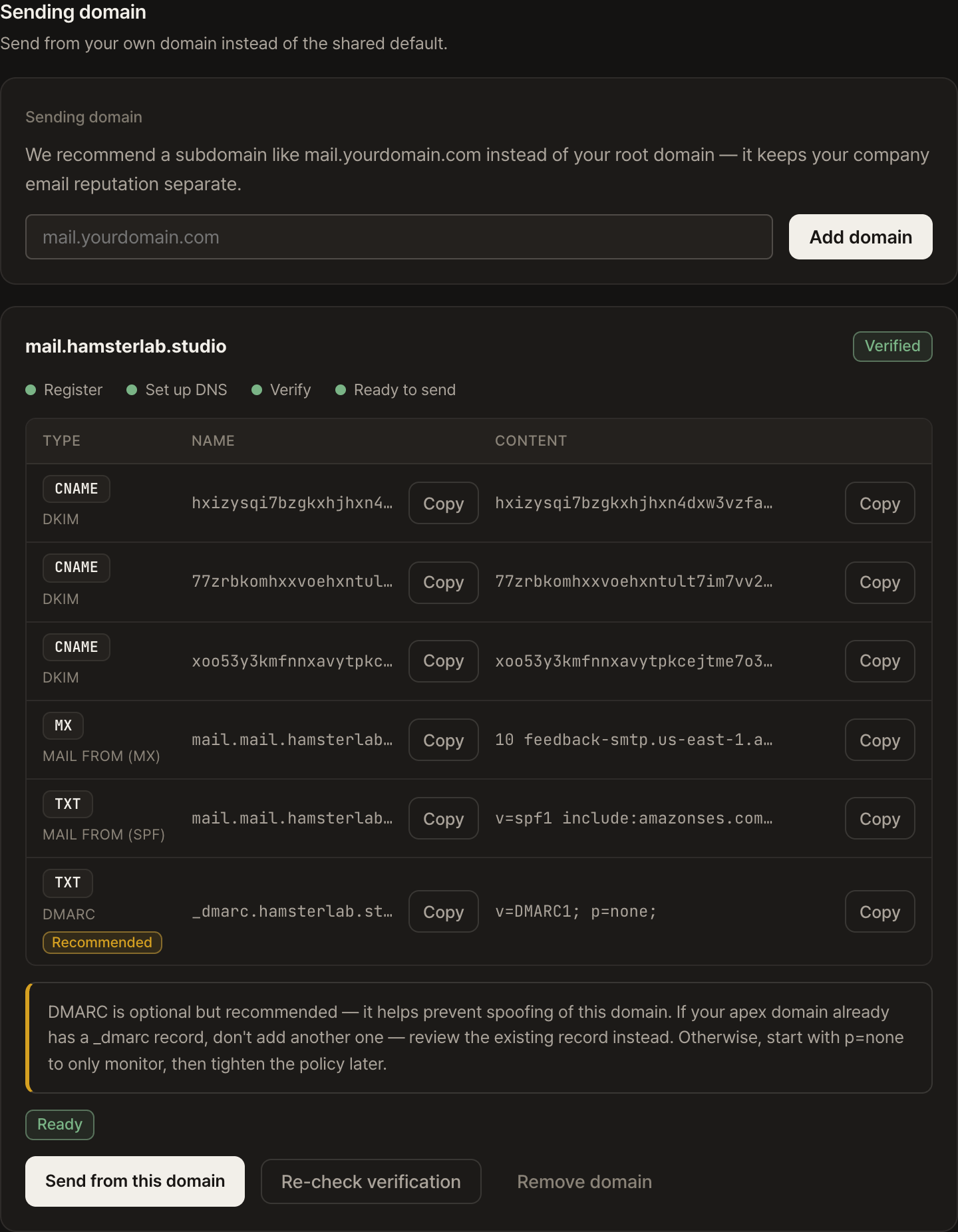
- Register the domainAdd a subdomain like mail.yourdomain.com. A subdomain is recommended over your root domain so it stays separate from your corporate mail reputation.
- Add the DNS recordsPaste the shown DKIM and MAIL FROM records into your domain's DNS. If you use Cloudflare, an API token can publish them all in one step.
- VerifyAdd the records, hit "Check verification," and the status updates. DNS propagation can take a few minutes up to 48 hours.
- Choose it as your from addressOnce verified, you can select this domain as the from address on the campaign send screen.
Which DNS records go in
DKIM (sender signature) and MAIL FROM (bounce handling) are required; DMARC is recommended and helps prevent spoofing. If you use Cloudflare, an API token can publish them all in one step.